Steplane › Kits › Customer onboarding and credit kit
Credit application and customer onboarding templates for freight companies
Get paid by every new customer.
Updated 19 October 2026 · Steplane is built by Paul, a logistics process specialist with over 13 years in logistics, including at some of the biggest freight forwarders in the world.
The customer onboarding and credit kit covers nine steps from a new customer's first enquiry to the first paid invoice: the customer form, a company and credit check, a credit limit, agreed terms, set-up, the first job and its review. The register flags customers over their limit or overdue. €49 (about $55).
Key facts
- 5 files: process and rollout plan, new customer form, company and credit check, customer register (Excel), trading terms summary.
- The register uses your own credit rules: payment days, overdue days and the limit for new customers.
- No job on credit before the terms are agreed.
- EU and US versions; editable in Word and Excel.
EU and US versions. Download right away after payment. Or get any 3 kits for €99 (about $110) or all 6 for €199 (about $225).
What's inside
| # | File | What it does | EU version | US version |
|---|---|---|---|---|
| 1 | Process and rollout plan | Nine steps with owners and records, money leaks and credit rules to agree once. | Same | Same |
| 2 | New customer form | The form your new customer fills in: legal name, registration, tax numbers, invoice email, PO rules. | VAT number, EORI | EIN, sales tax status |
| 3 | Company and credit check | Checks before you give credit, with red flags and a decision box. | VIES, company register | Business registration, trade references |
| 4 | Customer register (Excel) | Credit limits, terms, overdue days and an automatic status per customer. | Same | Same |
| 5 | Trading terms summary | A one-page summary of your terms for the customer to accept, to adjust with your lawyer. | CMR, EU late payment rules | Bill of lading, released value |
Files in the EU download: 1 Process-and-rollout-plan.docx, 2 New-customer-form.docx, 3 Company-and-credit-check.docx, 4 Customer-register.xlsx, 5 Trading-terms-summary.docx. US download: 1 Process-and-rollout-plan.docx, 2 New-customer-form.docx, 3 Company-and-credit-check.docx, 4 Customer-register.xlsx, 5 Trading-terms-summary.docx. Word (.docx) and Excel (.xlsx), fully editable.
What the files look like
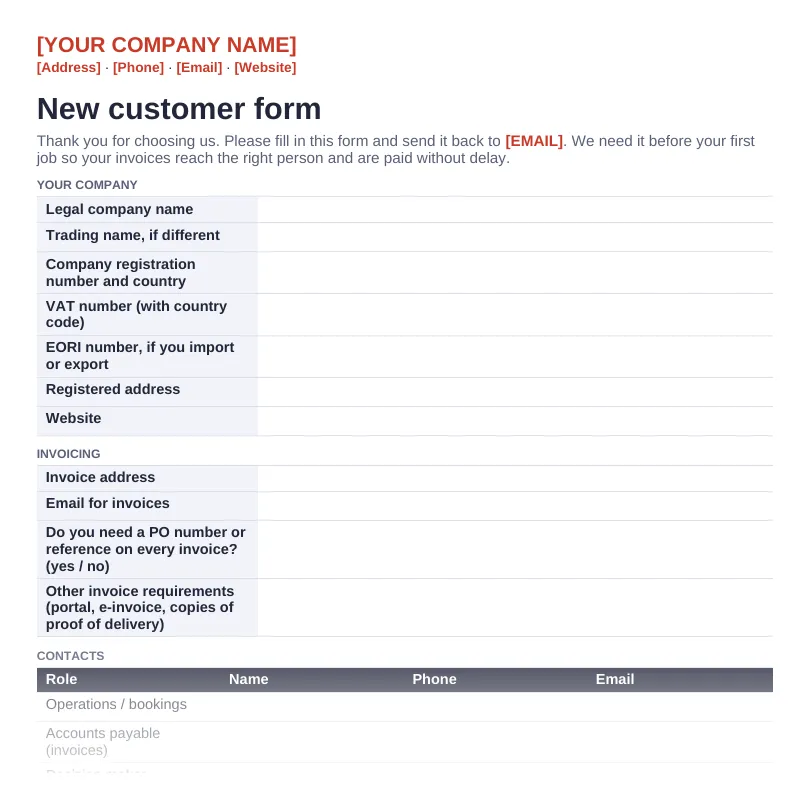
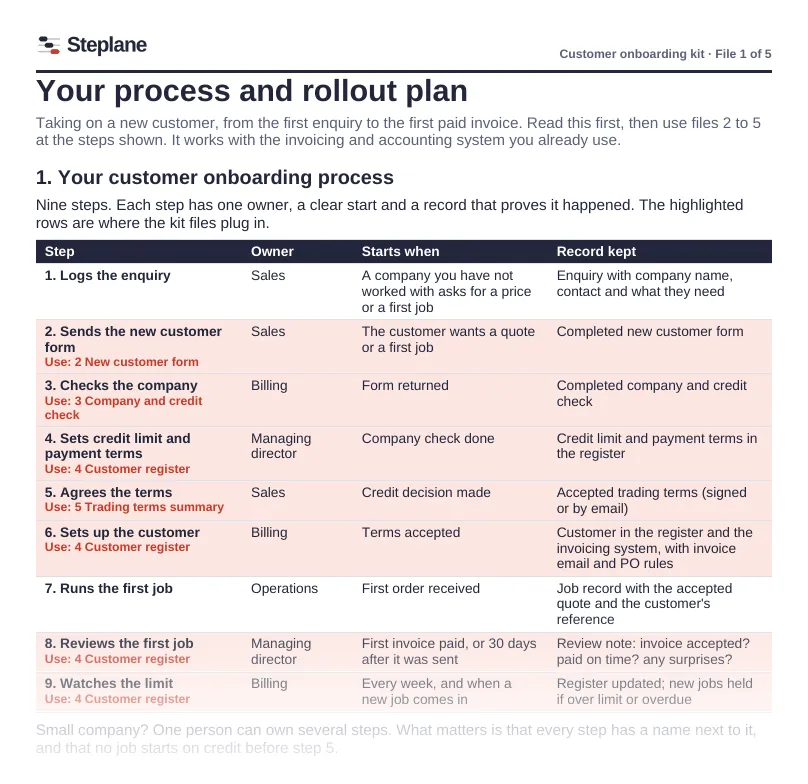
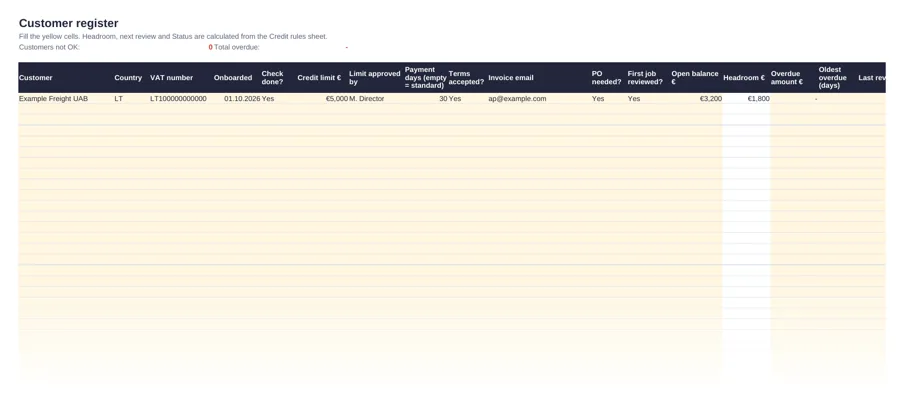
Previews of the European version. Every file is fully editable; replace everything in [brackets] with your own details.
The process it covers
Each step has one owner, a clear start and a record that proves it happened. This is the EU version; the US version uses US terms.
| # | Step | Owner | Starts when | Record kept |
|---|---|---|---|---|
| 1 | Logs the enquiry | Sales | A company you have not worked with asks for a price or a first job | Enquiry with company name, contact and what they need |
| 2 | Sends the new customer form | Sales | The customer wants a quote or a first job | Completed new customer form |
| 3 | Checks the company | Billing | Form returned | Completed company and credit check |
| 4 | Sets credit limit and payment terms | Managing director | Company check done | Credit limit and payment terms in the register |
| 5 | Agrees the terms | Sales | Credit decision made | Accepted trading terms (signed or by email) |
| 6 | Sets up the customer | Billing | Terms accepted | Customer in the register and the invoicing system, with invoice email and PO rules |
| 7 | Runs the first job | Operations | First order received | Job record with the accepted quote and the customer's reference |
| 8 | Reviews the first job | Managing director | First invoice paid, or 30 days after it was sent | Review note: invoice accepted? paid on time? any surprises? |
| 9 | Watches the limit | Billing | Every week, and when a new job comes in | Register updated; new jobs held if over limit or overdue |
Who it is for
Freight forwarders and transport companies that give new customers payment terms and want fewer late payments and bad debts.
Small and medium freight forwarding, transport, courier and warehouse companies in Europe and the US. It works whether your processes are written down today or not.
Free templates and related guides
Questions
How do I set a credit limit for a new transport customer?
A simple rule: expected monthly spend times (payment days plus 15) divided by 30, with a lower cap for new customers. The kit includes this rule and a register that applies it.
Does it replace my accounting system?
No. It works next to the invoicing and accounting system you already use.
Are the trading terms ready to use?
They are a summary template marked for adjustment. Have a lawyer review your full terms.
Who in my company can use the files?
Everyone in your own company: all staff and all branches, as often as you like. You can share the filled-in documents with customers, carriers and auditors. You cannot resell or give away the templates themselves.
Which programs do I need?
Microsoft Word and Excel. The files are standard .docx and .xlsx, so they also open in other common office programs.
When do I get the kit?
Straight after payment: a download link on screen and by email. The link works for 30 days; if it expires, write to hello@getsteplane.com with your order number and we send a new one.
Can I get an invoice with my company and VAT number?
Yes. Write to hello@getsteplane.com with your order number, company details and VAT number and we send the invoice.
What if the kit is not useful to us?
Email hello@getsteplane.com within 14 days of purchase and we refund the full price. You do not have to give a reason. See the terms.
Related
Not sure which process to start with?
The free check maps your quote-to-invoice process in about 10 minutes and shows where money leaks. No sign-up.
Start the free check